AI at work · · 12 min read
LangFlow vs Flowise vs n8n 2026: Which AI Tool Wins?
Compare LangFlow, Flowise, n8n, and Make to determine the best automation tool for your needs. Learn about their strengths, weaknesses, and ideal use cases, from AI prototyping to large-scale business automation. Discover real user insights from Reddit and expert analysis on workflow automation platforms.
 Mohamed Habbat
You're building an AI workflow in 2026 and you've got three browser tabs open — one for LangFlow, one for Flowise, one for n8n. A fourth has Make, maybe a fifth has Dify. Here's what Reddit users who've actually shipped with these tools think, updated for the tools as they exist today — not as they existed two years ago when most comparison posts were written.
This is a six-tool comparison. LangFlow, Flowise, n8n, Make, Activepieces, and Dify. The old four-tool version of this post had wrong claims. We've fixed them.
Agentic AI Workflow Tools — The Vocabulary Shift You Need to Know
In 2024, people called these "automation tools." In 2026, the term is agentic AI workflow tools.
The distinction matters. Classic automation connects apps — trigger A fires, action B runs. Agentic tools let an AI model decide what to do next: which tool to call, when to loop, when to stop. LangFlow, Flowise, and n8n have all added first-class support for this pattern. Make and Activepieces are catching up. Dify was built for it from day one.
If your use case involves an LLM making decisions — routing queries, calling APIs, retrieving documents — you're in agentic territory. That's a different tool choice than syncing a spreadsheet with a CRM.
What Changed in 2025–2026 — A Fast Update Per Tool
Here's what broke the old comparisons:
LangFlow: v1.x was a near-complete rebuild — redesigned canvas, proper debugging, multi-agent support now stable. The "not production-ready" blanket verdict needs nuance.
Flowise: v2 introduced native agent nodes. In v1, everything was a chain. In v2, agent nodes allow non-sequential reasoning loops. The "not powerful enough for production" claim was written against v1 and is no longer accurate.
n8n: The AI Agent node is now first-class, not an afterthought. The old framing that "n8n is not AI-focused" is factually wrong in 2026. n8n runs agentic loops with tool-calling, memory, and LLM-driven routing.
Make.com: Added an AI module builder in 2025. Still cloud-only, still expensive at scale, but "not for AI" is no longer accurate.
Activepieces: Grew significantly in r/selfhosted in 2025. Open-source Make alternative with a free community edition.
Dify: Now routinely evaluated alongside the original four. RAG + workflow hybrid. Polished managed offering. r/LocalLLaMA rates it highly for teams wanting Flowise-like RAG features without self-hosting overhead.
1. LangFlow
Best For: AI-native prototyping, multi-agent experimentation, LangChain-ecosystem workflows
What's new in v1.x: Complete canvas redesign with better component organization. Proper debugging tools — you can step through a flow and inspect intermediate outputs. Multi-agent support is now documented and stable, not buried in GitHub issues. The platform has shifted from "impressive demo, frustrating production story" toward "serious option for AI-heavy applications."
Pros:
- ✅ Best visual environment for AI complexity — when you're chaining retrievers, rerankers, and multi-step agents, LangFlow's canvas handles it more naturally than any other tool on this list
- ✅ Custom Python components — write a component once, reuse it across flows, share it across teams
- ✅ Strong LangChain integration — if you're already in the LangChain ecosystem, LangFlow speaks that language natively
- ✅ Active development velocity — the v1.x releases have been substantial; the team ships fast
- ✅ Free and self-hostable — open source, no license fee, deploy on your own infrastructure
Cons:
- ❌ Production stability requires discipline — breaking changes still happen between minor releases; pin your version and test upgrades before deploying
- ❌ Steep learning curve for newcomers — the UI is powerful but the conceptual overhead is real; understanding nodes, components, chains, and agents takes time
- ❌ Not for general automation — this is an AI-first tool; don't use it to send emails or update spreadsheets
Community signal (r/LangChain, r/LocalLLaMA): LangFlow v1.x is rated as a meaningful improvement. The common criticism is now the learning investment, not instability — you need to understand LangChain abstractions before the UI makes sense. For developers who know those abstractions, it's the best visual environment for complex AI workflows.
Use Case:
- Prototype multi-agent systems before committing to a production architecture
- Build your first RAG pipeline with Flowise — then compare the LangFlow approach side-by-side
- Experiment with retrieval strategies, reranker configs, and embedding models without writing code
2. Flowise
Best For: Low-code RAG pipelines, production AI chatbots, self-hosted AI agent deployment
What's new in v2: Agent node architecture — the headline change. In v1, flows were chains: deterministic, sequential. In v2, agent nodes let the LLM reason about what to do next. The UI was redesigned for clarity, error handling improved, and there's now cleaner separation between development and production configurations.
Pros:
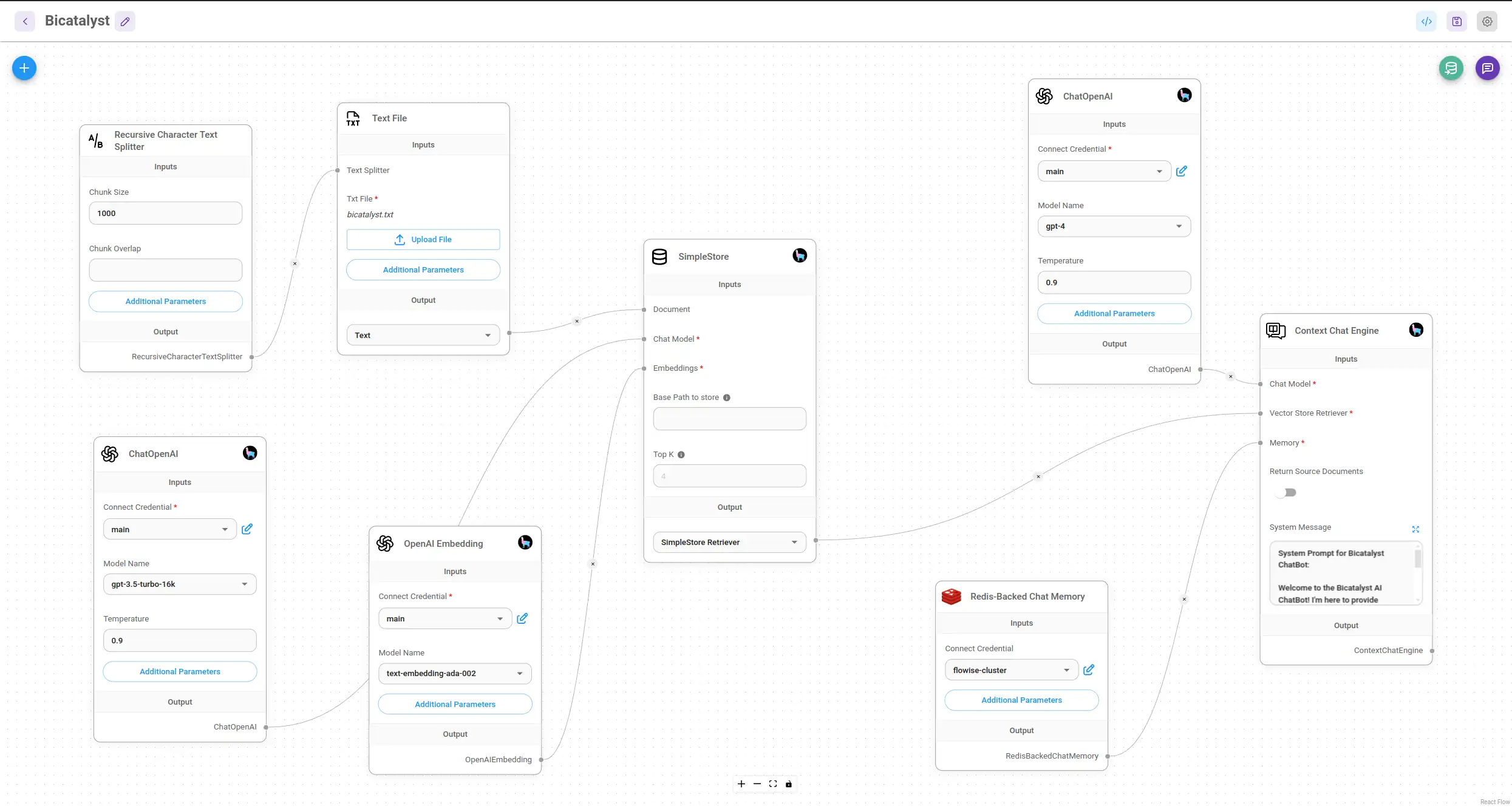
- ✅ Best tool for RAG without code — document ingestion, vector store configuration, embedding model selection — all visual, all working
- ✅ Flowise v2 agent nodes — the gap between "quick demo" and "production agent" has narrowed significantly
- ✅ Self-hosting is genuinely straightforward — Docker Compose in under 10 minutes; Kubernetes Helm chart for teams that need scale
- ✅ Growing community — r/flowise is active; real users sharing real production setups
- ✅ Free and open source — no per-seat cost when self-hosted
Cons:
- ❌ Customization limits — if you need deep control over retrieval logic or want to write custom Python, LangFlow gives you more rope
- ❌ Version migration pain — upgrading from v1 to v2 requires rebuilding some flows; not a patch upgrade
- ❌ Cloud pricing at scale — the managed cloud gets expensive fast beyond 10K predictions/month
Community signal (r/flowise, r/selfhosted): v2 reception was mixed initially — users disliked the flow rebuild requirement. By late 2025 the consensus shifted: agent nodes are worth the migration cost. Multiple r/flowise threads document production setups at thousands of queries per day. The "not production-ready" label is gone.
Use Case:
- Build a no-code tools for building AI agents pipeline against company documents
- Deploy an internal knowledge base chatbot with access to PDFs, Notion pages, and databases
- Prototype → test → deploy without writing a single line of Python
3. n8n
Best For: General workflow automation with AI capabilities, hybrid automation + AI pipelines
What's new in AI Agent node: Tool-calling, memory, and LLM-driven loops. The agent has access to HTTP requests, database queries, and n8n's full 400+ integration library. LLM support expanded to OpenAI, Anthropic, Gemini, and local models via Ollama. This is a first-class agentic execution environment, not a bolt-on API caller.
Pros:
- ✅ Best hybrid automation tool — no other tool on this list lets you wire AI reasoning into a broader workflow (send email → trigger Slack → update CRM → call AI) as cleanly as n8n
- ✅ Self-hostable, free community edition — deploy on any server; no execution limits on the community edition
- ✅ 400+ integrations — everything from GitHub to Stripe to custom HTTP requests
- ✅ AI Agent node is now first-class — not an add-on; a proper agentic execution environment with tool-calling, memory, and loop control
- ✅ Active development — n8n ships fast; the community edition is well-maintained
Cons:
- ❌ Not an AI-first tool — if your workflow is 100% AI reasoning, LangFlow or Flowise give you a better interface; n8n's strength is the hybrid case
- ❌ Cloud pricing tiers can surprise — execution-based pricing means complex workflows cost more than simple ones; model this before committing to the managed cloud
- ❌ Steeper learning curve than Make — the node-based UI is flexible but requires more setup than Make's polished onboarding
Community signal (r/n8n): The AI Agent node generated significant community activity in 2025. Most common pattern: existing n8n workflows + AI Agent node for the "smart routing" step. See our n8n for AI workflow automation guide for a real-world example.
Use Case:
- Send a customer support email to an AI Agent node that classifies intent, looks up order history, and routes to the right team
- Connect n8n to a RAG pipeline: trigger on new Slack message → AI Agent retrieves from Qdrant → returns answer → posts in thread
- Any workflow where business logic and AI reasoning need to live in the same pipeline
4. Make.com
Best For: No-code business automation, marketing and CRM workflows, teams that need a polished UI without self-hosting
What's new in 2025: The AI module builder added native AI actions — text generation, document analysis, AI-driven routing. Make is no longer zero-AI. The module builder doesn't match Flowise or LangFlow for complex pipelines, but covers the common cases: summarize a document, classify an input, generate an email.
Pros:
- ✅ Best visual UX on this list — the Make interface is the most polished; non-technical users can build real workflows without training
- ✅ 1,000+ app integrations — if it exists, Make probably connects to it
- ✅ Reliable at scale — Make runs millions of workflows reliably
- ✅ AI module builder — native AI actions without needing to configure LLM API nodes manually
Cons:
- ❌ No self-hosting — everything runs on Make's infrastructure; if data residency matters, this is a hard constraint
- ❌ Operations-based pricing adds up — a 10-step workflow running 1,000 times/month uses 10,000 operations; this gets expensive faster than it looks
- ❌ Not the right tool for complex AI pipelines — for deep RAG, multi-agent reasoning, or custom retrieval logic, Make is not the answer
Use Case:
- Marketing automation: new lead in HubSpot → AI generates personalized email → sends via Mailchimp
- E-commerce: new order → AI classifies product category → updates inventory system → notifies team
- Any workflow where the team building it is non-technical and the AI use case is simple text generation or classification
5. Activepieces
Best For: Self-hosters who want Make-like general automation without the cloud cost
Activepieces is the open-source Make alternative that r/selfhosted discovered in 2025. It doesn't have the AI depth of LangFlow or Flowise. It doesn't have Make's polished UI or integration count. What it has is a clean automation builder, a growing piece library, self-hosting as a first-class path, and a free community edition with no execution limits.
Pros:
- ✅ Fully open source — MIT licensed; self-host with no usage caps
- ✅ Make-like visual interface — trigger → actions flow builder; easier to pick up than n8n
- ✅ Growing piece library — 100+ integrations; not at Make's 1,000+ but covering most common use cases
- ✅ Free self-hosting — community edition is genuinely free, not "free with major limits"
- ✅ Active development — the team ships fast; r/selfhosted users report good responsiveness on issues
Cons:
- ❌ Smaller community than n8n or Make — fewer tutorials, fewer community templates, less documentation depth
- ❌ No native AI agent node — AI capabilities exist but are less developed than n8n's AI Agent node
- ❌ Integration gaps — some enterprise apps still missing; check your specific integrations before committing
Community signal (r/selfhosted, r/selfhostedai): Consistently recommended as the "n8n is too complex, Make is too expensive" option. Several 2025 threads document teams migrating from Make to Activepieces self-hosted and cutting automation costs to near-zero. Not for AI-heavy workflows, but strong for general automation on a budget.
Use Case:
- Self-hosted Zapier replacement for small teams wanting automation without SaaS pricing
- Connect apps, trigger webhooks, sync data across tools — without paying per operation
- Teams with a developer who can maintain a Docker Compose deployment and wants full data control
6. Dify
Best For: Teams wanting RAG + agentic workflows with a managed, team-friendly experience
Dify is the tool most likely to be new to readers of the original version of this post. It's been consistently appearing in r/LocalLLaMA and r/flowise comparison threads since 2025. The pitch: Flowise's RAG capabilities plus a more opinionated, polished platform designed for team collaboration rather than solo developers.
Pros:
- ✅ Best-in-class RAG UI for non-developers — document upload → knowledge base → chatbot in a workflow that requires no code and no node wiring
- ✅ Team collaboration built in — multiple users, role-based access, shared app library; Flowise is still primarily single-developer-focused
- ✅ Workflow + agent + RAG in one product — the platform spans use cases that require multiple tools elsewhere
- ✅ Managed cloud with a free sandbox tier — 200 OpenAI calls to get started, no credit card required; easier entry point than Flowise's cloud
- ✅ Open source and self-hostable — same code, same features, deploy on your own infrastructure
Cons:
- ❌ Less customizable than Flowise or LangFlow — Dify's opinionated structure makes simple things easy but complex configurations harder
- ❌ Cloud pricing at team scale — the Professional tier at $59/month is competitive for teams but significant for individuals
- ❌ Smaller integration ecosystem — not a general automation tool; primarily AI-focused; fewer app connectors than n8n or Make
Community signal (r/LocalLLaMA, r/flowise): The "Dify vs Flowise" debate is active in 2025–2026. Common verdict: Dify wins when you have a team and need collaboration; Flowise wins when you need deep customization. For pure RAG-to-chatbot pipelines, both work — team size and infrastructure preference decide.
Use Case:
- Deploy a RAG application for a team of 5–20 users who need shared access — see which AI automation platform fits your business
- Build a customer-facing AI assistant with knowledge base integration and conversation history
- Evaluate AI tools without infrastructure — Dify's free sandbox is the lowest-friction entry point on this list
2026 Pricing Comparison
Pricing verified against live sources as of March 2026. Self-hosting costs listed are infrastructure only — not license fees.
| Tool | Free Tier | Paid Cloud (entry) | Self-Host Cost | Notes |
|---|---|---|---|---|
| LangFlow | Free cloud account | Enterprise pricing (contact) | Free (open source) | No fixed cloud pricing published; self-host is the default for most users |
| Flowise | 2 flows, 100 predictions/mo, 5 MB storage | Starter: $35/mo (10K predictions, 1 GB storage) | Free (open source) | Pro: $65/mo (50K predictions, 10 GB, team roles) |
| n8n | Community edition (self-hosted, unlimited) | Starter: ~$24/mo (cloud, limited executions) | Free (community edition) | Pro: higher execution limits; Business: from ~$50/mo; Enterprise: custom |
| Make.com | 1,000 operations/mo | Core: ~$10.59/mo (10K operations) | ❌ No self-hosting | Operations add up fast; a 5-step workflow × 1,000 runs = 5,000 ops |
| Activepieces | Free (community edition, unlimited self-hosted) | Cloud Pro: ~$5/flow/month | Free (MIT licensed) | Self-hosted community edition has no execution limits |
| Dify | Sandbox: 200 OpenAI calls, no card required | Professional: $59/mo (team features, more storage) | Free (open source) | Enterprise: custom pricing |
The self-hosting verdict: LangFlow, Flowise, n8n, Activepieces, and Dify all support self-hosting with zero license fees. Make does not. If data residency or cost control matters, Make is the first tool to eliminate from your shortlist.
Which Tool Should I Use? — Decision Tree
Pick based on your primary constraint. No hedging — these are direct calls.
If you need AI-native workflows (RAG, agents, LLM chains):
- Deep customization + prototyping → LangFlow
- Production RAG chatbot, self-hosted → Flowise v2
- Production RAG chatbot, managed, team access → Dify
If you need general automation with some AI:
- Self-hosted, hybrid automation + AI → n8n
- Managed, non-technical team, polished UI → Make.com
- Managed but too expensive, self-hosting OK → Activepieces
If data residency is a hard requirement (Swiss DSG, GDPR, HIPAA):
- Any of: LangFlow, Flowise, n8n, Activepieces, or Dify — all support on-premises
- Make.com is the only tool on this list that cannot be self-hosted
If you're prototyping and haven't chosen a direction yet:
- Start with Dify's free sandbox (zero setup, immediate value)
- Or start with LangFlow locally (
pip install langflow→langflow run) - Commit to a production tool after you know what your AI workflow actually needs
If budget is the primary constraint:
- Self-host Flowise or n8n for near-zero cost
- Activepieces for general automation without per-execution pricing
If your team is non-technical:
- Make.com for business automation
- Dify for AI workflows
If you need security considerations when choosing an AI workflow tool:
- Prioritize self-hosted options (LangFlow, Flowise, n8n, Dify)
- Review the data processing agreements for any cloud option
Full Comparison Table
| Feature | LangFlow | Flowise v2 | n8n | Make.com | Activepieces | Dify |
|---|---|---|---|---|---|---|
| Primary Use | AI prototyping & agents | Low-code RAG & agents | Hybrid automation + AI | Business automation | Open-source general automation | RAG + agentic workflows |
| AI-Focused? | ✅ Yes | ✅ Yes | ✅ Hybrid | ⚠️ Partial | ⚠️ Basic | ✅ Yes |
| Self-Hosting? | ✅ Yes | ✅ Yes | ✅ Yes | ❌ No | ✅ Yes | ✅ Yes |
| Agentic AI? | ✅ Yes | ✅ Yes (v2) | ✅ Yes (AI Agent node) | ⚠️ Limited | ❌ Basic | ✅ Yes |
| RAG Support? | ✅ Yes | ✅ Best-in-class | ⚠️ Via integrations | ❌ Not native | ❌ Limited | ✅ Yes |
| Free Tier? | ✅ Yes | ✅ Yes | ✅ Yes (self-host) | ✅ 1K ops/mo | ✅ Yes (self-host) | ✅ Sandbox |
| Ease of Use | ⭐⭐⭐ | ⭐⭐⭐⭐ | ⭐⭐⭐ | ⭐⭐⭐⭐⭐ | ⭐⭐⭐⭐ | ⭐⭐⭐⭐ |
| Production-Ready? | ⚠️ Yes, with caveats | ✅ Yes | ✅ Yes | ✅ Yes | ✅ Yes | ✅ Yes |
| Customizability | ✅ High | ⭐⭐⭐ | ✅ High | ❌ Low | ⭐⭐⭐ | ⭐⭐⭐ |
| Team Collaboration | ❌ Limited | ⚠️ Growing | ⚠️ Growing | ✅ Yes | ⚠️ Basic | ✅ Yes |
| Community | Strong | Strong | Very strong | Strong | Growing | Growing |
Swiss DSG Callout — Data Residency for AI Workflows
Running AI workflows in Switzerland?
LangFlow, Flowise, n8n, Activepieces, and Dify all support on-premises deployment. Your data — prompts, documents, vector embeddings — never leaves your infrastructure.
Make.com's cloud-only model means your data is processed on their servers. Check their Data Processing Addendum against your Swiss DSG obligations before deploying workflows that handle personal data.
For workflows processing data subject to Swiss DSG or GDPR, self-hosted open-source tools are the default recommendation. Pair any of them with a local embedding model via Ollama and you have a fully air-gapped AI pipeline. See security considerations when choosing an AI workflow tool for the data processing specifics.
Honorable Mentions
- StackStorm / Prefect — event-driven automation at internet scale with full Python control; infrastructure tools, not no-code builders
- Postman — supports request chaining for API automation; solid for developers already in that ecosystem
- LangGraph (headless) — the underlying graph library LangFlow builds on; use it when you need agent graph control in pure Python without a visual UI
- GumLoop — Reddit claimed it "beats all these tools" in 2025. One thread, limited corroboration. Real product, but not enough community validation yet for a fair comparison. Worth evaluating independently.
FAQ
What is the difference between LangFlow and Flowise?
Both are visual AI workflow builders, but for different users. LangFlow exposes LangChain's full complexity visually — powerful for developers who know LangChain and want to experiment with complex retrieval and agent patterns. Flowise is more opinionated: it handles more under the hood, getting you to a working RAG pipeline or chatbot faster with less prior knowledge. For production RAG, Flowise v2 is the more direct path. For multi-agent experimentation and custom AI logic, LangFlow gives you more control.
Is n8n better than Make for AI workflows?
In 2026, yes — for AI-heavy workflows. n8n's AI Agent node supports tool-calling, reasoning loops, and memory in ways Make's AI module builder does not. For simple business automation (summarize an email, route a CRM record), Make's UI and integrations may win. For anything involving multi-step AI reasoning or custom LLM logic, n8n is more capable.
Which workflow tool is best for self-hosting in 2026?
For AI workflows: Flowise (easiest path to self-hosted RAG/agents) or n8n (best for hybrid automation + AI). Both run with Docker Compose in under 10 minutes. All five open-source tools on this list — LangFlow, Flowise, n8n, Activepieces, Dify — are free to self-host with no execution caps.
What is Activepieces and how does it compare to n8n?
Activepieces is an open-source Make alternative — visually similar to Make's builder, easier to learn than n8n. Fewer integrations (~100+ vs n8n's 400+) and less mature AI support. Wins on simplicity: the community edition has no usage limits, the UI is friendlier for non-developers, and setup is simpler. Best fit: "n8n is too complex, Make is too expensive" — standard automation use cases where self-hosting matters.
Can Flowise replace LangChain?
Not directly — Flowise is built on top of LangChain. What it replaces is the need to write LangChain code. For most practical AI applications (RAG chatbot, document assistant, simple agent), Flowise is sufficient. For genuinely custom retrieval logic, novel agent architectures, or complex tool-calling patterns, you'll hit Flowise's abstraction limits and need to write LangChain or LangGraph code directly.
Final Verdict — Based on User Feedback
The Reddit consensus as of early 2026 is clearer than it was two years ago.
For pure AI workflows, Flowise v2 is the most practical entry point for teams that want production reliability without writing code. LangFlow is the better laboratory — more flexible, more powerful, more learning required. Dify wins when you have a team and want collaboration without infrastructure headaches.
For hybrid workflows where AI is one step in a larger process, n8n is the clear choice. Nothing else combines 400+ integrations with a first-class AI Agent node. Activepieces is the self-hosted alternative when n8n's complexity is too much.
Make.com is still the best non-technical business automation platform. But its AI capabilities are a catch-up story, not a native strength, and cloud-only is a hard constraint for regulated industries.
Pick based on your bottleneck:
- AI depth → LangFlow or Flowise
- Automation breadth → n8n or Make
- Team collaboration → Dify or Make
- Budget / self-hosting → Flowise, n8n, or Activepieces
- Starting fast → Dify's sandbox — 60 seconds from signup to working RAG demo