AI at work · · 8 min read
No-Code RAG Tutorial with Flowise 2026: Build It Fast
In the rapidly evolving domain of artificial intelligence (AI), the advent of Large Language Models (LLMs) like GPT-4 has ushered in a new era of innovation and possibilities. Central to harnessing the full potential of these technologies are tools and frameworks such as LangChain, LlamaIndex, and Flowise.
 Mohamed Habbat
No-Code RAG Tutorial with Flowise 2026: Build It Fast
Every Flowise RAG tutorial you find from 2024 is broken. The UI changed completely, LlamaIndex rebranded, and LlamaParse didn't exist yet. This one was written against Flowise v2 in 2026, step by step — from blank canvas to a production-ready knowledge base that answers questions about your documents.
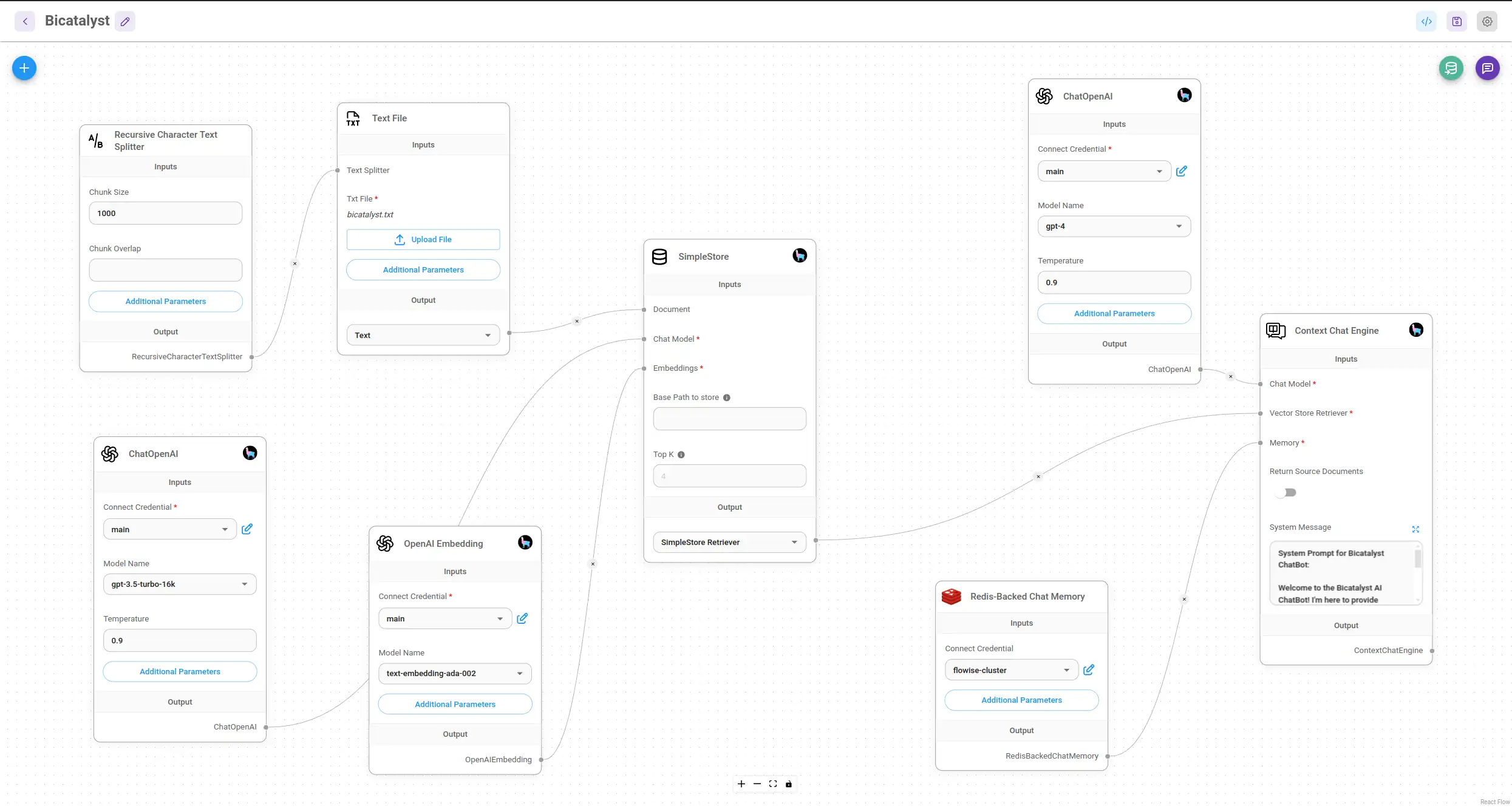
Here is the pipeline we would build today.
What's RAG and Why It Still Matters in 2026
Retrieval-Augmented Generation (RAG) solves the biggest problem with LLMs: they don't know your data.
Instead of fine-tuning (expensive, slow, loses general knowledge), RAG retrieves relevant documents from your knowledge base at query time and hands them to the LLM as context. The LLM answers using your documents, not just its training data.
Three components make this work:
- Vector embeddings — your documents converted into numerical representations that capture semantic meaning. Similar concepts cluster together in embedding space.
- Vector store — a database that stores embeddings and retrieves the most similar ones for a given query. Qdrant, Chroma, and Pinecone are common choices.
- LLM — takes the retrieved documents as context and generates a grounded, accurate answer.
In 2024, building this meant writing Python. In 2026, Flowise handles the entire pipeline visually. You connect nodes, configure API keys, and test — no code required.
Flowise v2 — What Changed and Why It Matters
If you used Flowise before 2025, the v2 UI will look unfamiliar. Here's what changed:
Agent nodes are first-class. Flowise v2 introduced a clear split between "Chatflows" (chains, no autonomous decision-making) and "Agentflows" (multi-step agents that decide which tools to use). For basic RAG, you'll use Chatflows. For agentic RAG, you'll use Agentflows.
Document loaders are modular. Each file type (PDF, Word, Notion, web scrape) is a separate node. You chain a loader → text splitter → embeddings → vector store. The old SimpleStore is gone.
LlamaParse integration is native. You no longer need manual chunking for structured PDFs. LlamaParse is available as a document loader node.
The UI itself is redesigned. The left panel is now a node library (searchable). The canvas is cleaner. Multi-flow management is improved.
[SCREENSHOT: Flowise v2 main UI — the canvas view with the node library panel open on the left, showing the searchable node categories: Document Loaders, Embeddings, Vector Stores, LLMs, etc.]
Step-by-Step: Build a RAG Pipeline in Flowise v2
Prerequisites
- Flowise installed (Docker:
docker run -d -p 3000:3000 flowiseai/flowise, or local:npx flowise start) - OpenAI API key (or alternative: Anthropic, Ollama for local)
- Documents to index (PDF, Word, Notion export — whatever you're working with)
Step 1 — Create a new Chatflow
Open Flowise at http://localhost:3000. Click Add New → Chatflow. Name it (e.g. "Company Knowledge Base").
[SCREENSHOT: Flowise v2 "Add New" dropdown showing Chatflow and Agentflow options]
Step 2 — Add a Document Loader
In the node library, search for your document type:
- PDF File — for PDF uploads
- LlamaParse — for better PDF parsing (tables, complex layouts)
- Web Scraper — for URLs
- Notion — for Notion pages via API
Drag your chosen loader onto the canvas.
For most use cases in 2026, use LlamaParse instead of the generic PDF loader — it handles complex PDFs significantly better (see the LlamaParse section below).
[SCREENSHOT: Flowise v2 canvas with a LlamaParse document loader node, showing the API key field and file upload option]
Step 3 — Add a Text Splitter
Attach a Recursive Character Text Splitter to your document loader. This splits documents into chunks before embedding.
Recommended settings for most use cases:
- Chunk size: 1000 characters
- Chunk overlap: 200 characters
The overlap ensures context isn't lost at chunk boundaries. Adjust based on your document type — technical docs with long paragraphs benefit from larger chunks (1500–2000), while Q&A formats work better with smaller ones (500–800).
[SCREENSHOT: Recursive Character Text Splitter node connected to the LlamaParse loader, with chunk size and overlap fields visible]
Step 4 — Add an Embeddings Node
Search for OpenAI Embeddings (or your preferred provider). Connect it to the text splitter.
In the node config:
- Model:
text-embedding-3-small(faster, cheaper, nearly as good as ada-002) - API Key: your OpenAI key
For fully on-premises deployments, use Ollama Embeddings with nomic-embed-text — no data leaves your server.
[SCREENSHOT: OpenAI Embeddings node connected to the text splitter, model dropdown showing text-embedding-3-small selected]
Step 5 — Add a Vector Store
Search for Qdrant (recommended for self-hosted), Chroma, or Pinecone (managed).
For Qdrant:
- Run Qdrant:
docker run -p 6333:6333 qdrant/qdrant - Set the URL to
http://localhost:6333 - Collection name: something descriptive
Connect the vector store to the embeddings node.
[SCREENSHOT: Qdrant vector store node connected to OpenAI Embeddings, showing URL, collection name, and "Upsert" button]
Click Upsert to index your documents. Flowise will process them through the loader → splitter → embeddings → vector store pipeline.
Step 6 — Add a Retriever
Add a Vector Store Retriever node. Connect it to your vector store. Set Top K (how many chunks to retrieve per query) — 4 is a good default. Increase to 6–8 for complex, multi-part questions.
Step 7 — Add a Conversational Retrieval Chain
Search for Conversational Retrieval QA Chain. Connect:
- The retriever output → chain retriever input
- An OpenAI LLM node (or your preferred LLM) → chain model input
In the LLM node, set your model (gpt-4o-mini is fast and cost-effective for most RAG use cases; gpt-4o for higher quality).
[SCREENSHOT: Completed Flowise v2 RAG chatflow — LlamaParse → Text Splitter → OpenAI Embeddings → Qdrant → Retriever → Conversational Retrieval QA Chain → OpenAI LLM, all connected]
Step 8 — Test It
Click Chat (top right). Ask a question about your documents. You should get a grounded answer with source citations if your chain is configured to return them.
LlamaParse — Better Document Ingestion Without the Chunking Pain
Standard PDF loaders extract text linearly. Tables become garbled. Headers lose hierarchy. Footnotes land in the middle of paragraphs.
LlamaParse uses a dedicated parsing model that understands document structure — tables stay as tables, headers become semantic markers, multi-column layouts are handled correctly.
In Flowise v2, LlamaParse is a drop-in replacement for the PDF File loader. You'll need a free LlamaCloud API key from cloud.llamaindex.ai.
When to use it:
- PDFs with tables (financial reports, product specs, contracts)
- Multi-column documents (academic papers, brochures)
- Any document where standard chunking produces garbled output
When the standard loader is fine:
- Simple text-heavy PDFs (blog exports, ebooks)
- Documents where you're controlling the source format
At BiCatalyst, we switched to LlamaParse for client document processing and saw measurably better retrieval accuracy on structured documents — fewer hallucinations on table data specifically.
Agentic RAG — Going Beyond Basic Retrieval
Basic RAG is a fixed pipeline: question in → retrieve → answer out. The LLM doesn't decide how to retrieve or whether to retrieve at all.
Agentic RAG changes this. The agent decides:
- Whether retrieval is needed for a given question
- Which knowledge base to query (if you have multiple)
- Whether to follow up with a second retrieval if the first result is insufficient
- When to escalate to a web search
In Flowise v2, this is built with Agentflows. Instead of a Chatflow with a fixed retrieval chain, you create an agent with a retrieval tool attached.
How to build it:
- Create a new Agentflow (not Chatflow)
- Add a Tool Agent node with your LLM
- Add a Retriever Tool node — point it to your Qdrant collection
- Connect the tool to the agent
The agent will now decide when to call the retriever based on the user's question. For general conversation it won't retrieve. For questions about your documents, it will.
Practical example: We built an agentic RAG system for a client with three document collections (product specs, contracts, pricing). A single agent routes queries to the right collection based on the question — no manual routing logic required.
Dify vs Flowise — Which Should You Use for No-Code RAG?
Both are no-code RAG tools. The choice depends on your priorities:
- Self-hosting control: Flowise wins. Simpler Docker setup, lighter resource footprint, easier to run on a single server.
- Multi-user collaboration: Dify wins. Built-in team workspaces, user management, and a polished UI for non-technical users.
- Customisation: Flowise wins. The node-based canvas gives fine-grained control over every pipeline step.
- Managed cloud option: Dify wins. Dify Cloud is a clean managed offering; Flowise's cloud tier is less mature.
- LlamaParse integration: Both support it, but Flowise's native node makes it simpler.
- Agentic workflows: Both support agents, but Flowise's Agentflow gives more flexibility in tool composition.
Verdict: Flowise for developers who want control and self-hosting. Dify for teams where non-technical users need to interact with the system.
Production RAG Checklist
Building a demo RAG in Flowise takes 20 minutes. Making it production-ready takes more thought.
Chunking strategy
- Start with 1000 chars / 200 overlap for general text
- Reduce chunk size (500–600) for Q&A documents where answers are short and specific
- Increase (1500–2000) for technical documentation where context is spread across paragraphs
- Use LlamaParse for structured PDFs — it changes the chunking problem entirely
Embedding model selection
text-embedding-3-small— best cost/performance for most use cases (OpenAI)text-embedding-3-large— higher accuracy, 5× the cost — justified for high-stakes retrievalnomic-embed-textvia Ollama — fully local, no data sent externally, competitive quality- Domain-specific embeddings (e.g. legal, medical) — only worth it if your domain is highly specialised
Vector store for self-hosters
- Qdrant — best performance, Docker-native, excellent filtering capabilities. Our default recommendation.
- Chroma — easiest to start, less suitable for large collections
- Weaviate — strong at hybrid search (BM25 + vector), more complex setup
- Pinecone — managed, great for teams who don't want to run infrastructure, but data leaves your server
Evaluation — don't skip this Before going live, test retrieval quality:
- Ask 20–30 questions your users will actually ask
- Check: are the retrieved chunks relevant? Is the LLM answer grounded in them?
- Tools: ragas for automated evaluation, or a simple spreadsheet tracking retrieved chunks vs expected answers
Latency
- Embedding generation is fast (< 200ms for most queries)
- Vector retrieval is fast (< 100ms for Qdrant at most scales)
- LLM response time is where latency lives —
gpt-4o-miniis 3–5× faster thangpt-4owith acceptable quality loss for RAG - Add a Redis cache for repeated queries if your use case has predictable question patterns
Running RAG in Switzerland? Flowise can be self-hosted entirely on Swiss infrastructure — Hetzner, Init7, or your own hardware. Pair it with Ollama embeddings and a local LLM (Llama 3.x, Mistral) and no data leaves your server. This matters if your documents contain client-confidential data or are subject to Swiss DSG. See our guide on local LLM integration for secure and free language model execution for the full on-premises setup.
FAQ
Is Flowise production-ready in 2026? Yes, with caveats. Flowise v2 is significantly more stable than v1. The node-based pipeline is production-grade. For high-availability deployments, run it behind a load balancer with a persistent vector store (Qdrant in a cluster, or Pinecone). The weak point is observability — you'll want to add your own logging layer for production use.
What is LlamaParse and do I need it? LlamaParse is a document parsing service from LlamaIndex that understands document structure — tables, headers, multi-column layouts. You don't need it for simple text-heavy PDFs, but it makes a significant difference for structured documents. The free tier (1000 pages/day) covers most small-to-medium deployments.
Can I run a RAG pipeline without sending data to OpenAI?
Yes. Use Ollama for local embeddings (nomic-embed-text) and a local LLM (Llama 3.x, Mistral, Phi-3). Flowise supports both natively. Performance is slightly lower than GPT-4o, but for internal tools and data-sensitive use cases, full on-premises deployment is the right call.
What is the difference between RAG and fine-tuning? Fine-tuning trains the model on your data, changing its weights. It's expensive, slow, and the model loses some general knowledge. RAG adds your data as context at inference time — no training, much cheaper, knowledge is always current. RAG is almost always the right answer for document Q&A use cases.
Flowise vs LangChain for no-code RAG — which is easier? Flowise, by a wide margin. LangChain requires Python code. Flowise provides a visual canvas. That said, LangChain gives more control — it's visual vs code-first, not better vs worse.
Internal Links
- Compare Flowise with other no-code AI tools → LangFlow vs Flowise vs n8n vs Make comparison
- Alternative approach to RAG using n8n and Qdrant → Build a trustworthy AI documentation assistant with n8n, Qdrant, and Crawl4AI
- Combine local LLMs with RAG for private knowledge retrieval → Local AI integration for secure and free language model execution
- Give your AI agents a knowledge base with RAG → AI agents for business: streamline tasks and boost results
- Add RAG to your AI chatbot for accurate answers → Revolutionizing business customer engagement with advanced AI chatbots